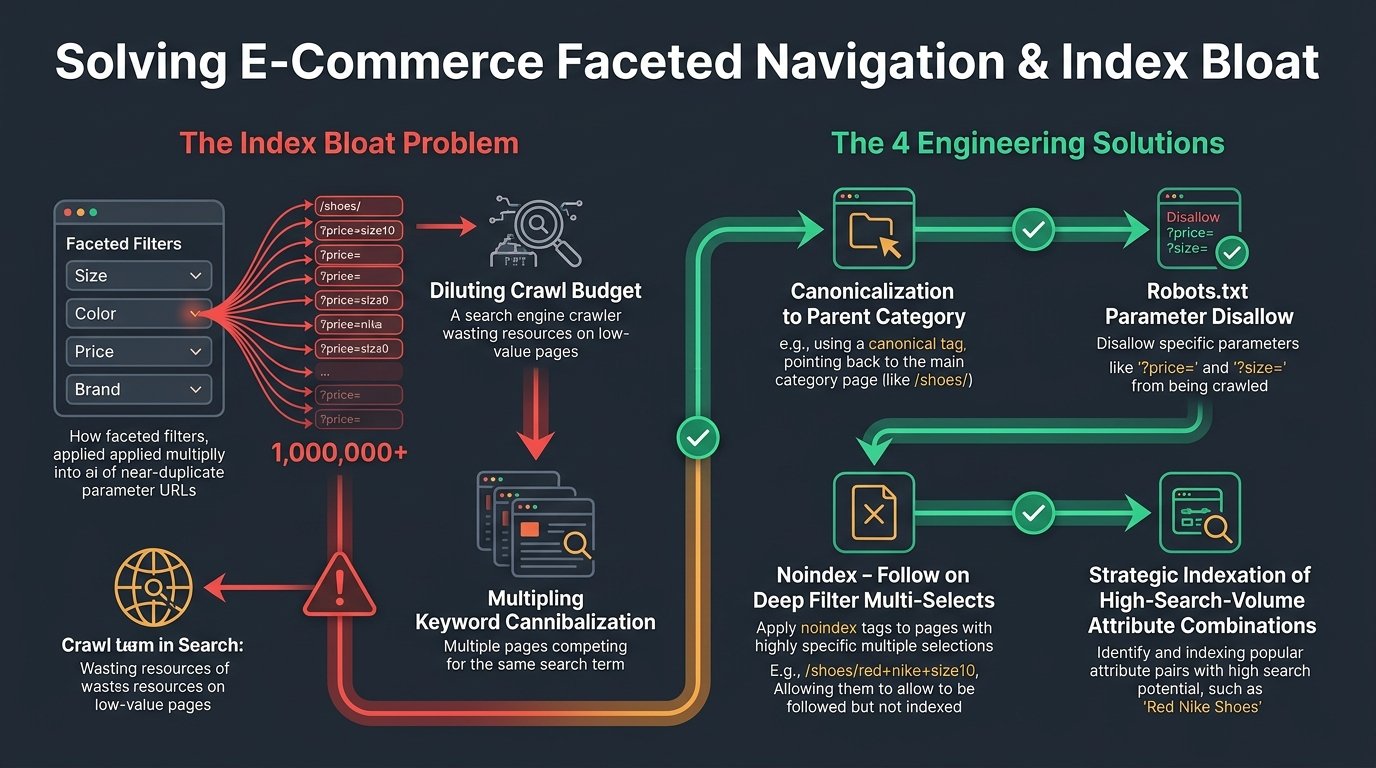
For large-scale e-commerce stores, real estate portals, and marketplace platforms, index bloat is a silent organic revenue killer. When your website generates millions of low-value, duplicate, or parameter-polluted URLs that Google indexes, search bots waste their crawl budget, internal link equity is diluted, and Google’s site-wide quality algorithms quietly downrank your high-priority commercial money pages.
- Site-Wide Quality Degradation: Google evaluates website helpfulness on a domain-wide level. If 80% of your indexed URLs are thin filter combinations, auto-generated tags, or zero-result searches, your entire domain’s authority is suppressed.
- Crawl Budget Waste: Enterprise search bots have finite time to crawl your server. When Googlebot spends 75% of its crawl requests on faceted parameters, your new product releases and key landing pages sit undiscovered for weeks.
- The Robots.txt Trap: Disallowing bloated URLs in
robots.txtdoes not remove them from Google’s index. It simply freezes them in search results as indexed URLs with no snippet. Proper removal requires HTTP 410 headers ornoindextags.
How to Detect Index Bloat: The GSC Diagnostic Gap
The fastest way to verify whether your website suffers from severe index bloat is comparing two numbers in Google Search Console (GSC):
- Open the Page Indexing report in GSC and note the total number of “Indexed Pages.”
- Compare that figure to the total submitted URLs in your verified XML Sitemaps.
If your sitemap contains 15,000 legitimate products and categories, but Google Search Console reports 240,000 indexed URLs, you have a 16x index bloat ratio. Search engines are currently indexing 225,000 low-quality digital ghost pages that degrade your domain authority.
The 5 Primary Culprits Behind Index Bloat
| Bloat Mechanism | Technical Cause | Correct Architectural Fix |
|---|---|---|
| Faceted Navigation Filters | Multi-select attributes (e.g., ?color=blue&size=xl&sort=asc) creating endless combinatorial URLs. |
Canonicalize multi-filters to base category; employ AJAX filters without unique URLs. |
| Internal Site Search Results | Internal search query parameters (e.g., /search?q=running+shoes) being crawled and indexed. |
Add noindex, follow robots meta tag and disallow /search* in robots.txt. |
| Legacy Pagination Archives | Thousands of deep paginated archives (e.g., /blog/page/185/) with duplicate snippets. |
Self-referencing canonicals with clear breadcrumbs, or consolidate legacy thin archives. |
| Session IDs & Tracking Tags | URLs containing UTM tags, affiliate tokens, or session IDs (?sid=12345) getting indexed. |
Strip session parameters at the CDN edge; enforce strict canonical targets. |
| Auto-Generated WordPress Tags | Content authors creating hundreds of unused tag archives containing only 1 post each. | Set tag archives to noindex or bulk 301 redirect thin tags into parent categories. |
The 4-Step Action Plan to Purge Millions of Junk URLs
Step 1: Segment and Isolate Bloat Patterns
Export your full URL index from Search Console via BigQuery or run an unconstrained server log audit. Identify the URL parameter patterns responsible for 90% of the junk entries (e.g., all URLs containing ?filter_ or /tag/).
Step 2: Deploy the Correct HTTP Response Code
Do not simply disallow the URLs in your robots.txt file. If Google has already indexed them, a disallow directive prevents Googlebot from crawling the page to see that it should be removed, leaving them permanently trapped in search results. Instead:
- For Permanent Junk Pages: Return an HTTP 410 Gone response code. A 410 status code instructs Google that the page is permanently deleted and purges it from the index significantly faster than a standard 404.
- For Pages with High Residual Backlinks: Execute targeted 301 Permanent Redirects to the most relevant parent category page to preserve external link equity.
- For Pages Users Need to Access: Add a
<meta name="robots" content="noindex, follow">tag into the<head>, allowing users to browse while keeping search bots out of the index.
Step 3: Create Temporary “Purge Sitemaps”
To accelerate de-indexing of 100,000+ bloat URLs, create a temporary XML sitemap containing only the URLs you want removed (which are now serving 410 or noindex headers) and submit it to Search Console. This forces Googlebot to rapidly re-crawl the bloat URLs, discover the removal status, and purge them from the index in weeks rather than months.
Step 4: Lock Down Crawl Paths in Robots.txt
Once Google Search Console confirms that the bloated URLs have dropped from the index, add clean disallow rules to your robots.txt file to permanently prevent Googlebot from re-discovering the parameter paths in the future.
Need to Clean Massive Index Bloat on Your Domain?
At SEO Sadhu, we have rescued enterprise e-commerce catalogs and content portals by purging millions of wasted URLs. We streamline crawl budgets, restore domain quality signals, and unlock dramatic ranking lifts on core commercial keywords.
Frequently Asked Questions (FAQ)
How long does it take for Google to remove de-indexed URLs from Search Console?
Depending on domain crawl frequency, purging large batches of bloat URLs (50,000+) typically takes between 3 to 8 weeks. Submitting temporary purge sitemaps can accelerate this timeline significantly.
Will fixing index bloat immediately increase my website traffic?
Yes. Once Googlebot stops wasting resources crawling thousands of duplicate filter combinations, it redirects crawl frequency to your primary category and product pages. Clients routinely experience noticeable ranking lifts across core commercial terms within 30 to 60 days of resolving index bloat.
What is the difference between a 404 Not Found and a 410 Gone status code?
A 404 status indicates a page is missing, but Google treats it as potentially temporary and may re-crawl it repeatedly for months. A 410 status explicitly communicates that the page was deliberately and permanently removed, prompting Googlebot to purge it from the index far more aggressively.